Kling 4.0 Use Cases: Projects, Audiences and Workflows
Kling 4.0 use cases for creators and small teams: practical briefs, prompt examples, audience fit, review criteria and when to use another production method.
A short product reveal, an animated mascot and a film’s rough storyboard can all use generated video. They need very different review standards. A storyboard can tolerate a rough texture if the staging is clear. A product advertisement cannot quietly change the object it is selling.
This guide is for independent creators and small content teams deciding where Kling 4.0 might fit into a production workflow. Each scenario includes the intended audience, required inputs, a suggested process, a prompt, an acceptance criterion and a reason to stop. These are project plans, not customer case studies or evidence of higher conversion.
Kling’s published 4.0 materials describe longer native scenes and multiple keyframes, which can help structure a brief. Access and available controls depend on the selected product. This site’s general option labelled “Kling 4.0” currently uses Seedance 2 Mini; do not assume it exposes every official feature. The separate Motion Control tool uses actual Kling 2.6 motion transfer.
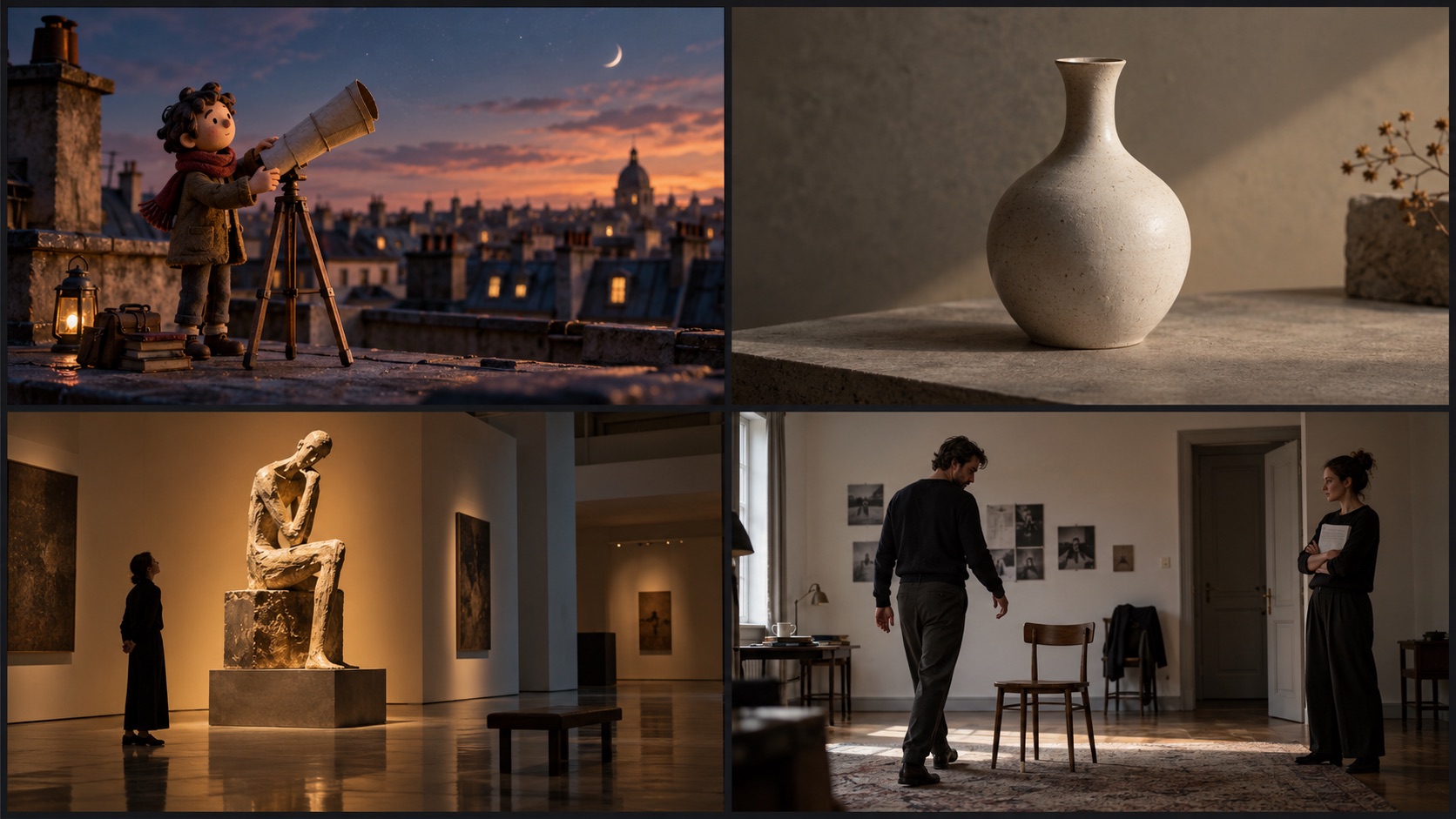
Picture a first project through four deliverables
- Top left · Creator opening
- Top right · Product atmosphere
- Bottom left · Creative treatment
- Bottom right · Blocking rehearsal
AI editorial illustration, not a Kling generation. Illustrations of the project ideas below, not client work or measured success stories.
Start with the audience and the deliverable
The useful question is not “Which industry uses AI video?” It is “Which part of my next deliverable can I generate, inspect and replace if it fails?” Choose work whose errors are observable and whose scope is small enough to revise.
| Your role | A sensible first task | Who watches it | Main acceptance criterion |
|---|---|---|---|
| Solo social creator | A short visual hook or fictional character beat | Viewers deciding whether to keep watching | The action reads immediately |
| Ecommerce content lead | An atmospheric product reveal | People comparing product options | The object remains accurate |
| Small agency producer | A treatment or campaign concept | A client approving creative direction | The idea is clear and labelled as a concept |
| Filmmaker or animator | A blocking study or transition test | Director, editor or animation team | Staging and timing are understandable |
| Character creator | A short reference-driven gesture | Viewers following a recurring character | Identity and movement remain readable |
| Educator or trainer | A fictional context scene | Learners entering a lesson | The scene does not teach an incorrect procedure |
| In-house communications lead | A brief illustrated introduction | Colleagues or event attendees | Tone, facts and identity are reviewed |
You may occupy several of these roles. Pick the row that matches the current deliverable. A freelancer making an ecommerce ad should use the product accuracy checks even if most of their work is entertainment.
1. Social creators: a clear visual hook
Best fit: a fictional scene or character action whose purpose is to introduce a topic. This is useful when you need a distinctive visual opening and do not need documentary footage of a real event.
Prepare: a one-line premise, a consistent character image if needed, a target format and a place for the eventual caption. Keep the action readable without relying on tiny text inside the generated frame.
Workflow: sketch the opening composition, choose one surprising but comprehensible action, generate a short candidate, then place it before the actual message in your edit. Compare the generated hook with a simpler static or recorded alternative. The comparison should concern communication, not just visual novelty.
A small clay astronomer opens a paper telescope on a quiet rooftop.
The telescope unfolds once, revealing a warm glow inside.
One steady medium shot, soft evening light, plain sky.
Finish with the character looking toward the glow.
Leave clear space above the character for a caption added later.
Accept when: a viewer can describe the action after a single viewing, the character remains consistent and the final frame connects naturally to the next part of the video.
Stop when: the visual needs a long explanation to make sense, repeated attempts change the character beyond recognition or the concept depends on imitating a real person without permission. Simplify the idea or record the introduction yourself.
Do not claim engagement gains before publishing and measuring them. If you test two openings, keep the main message and distribution conditions as comparable as possible. Record what changed so the result can inform your next brief.
2. Ecommerce teams: an atmospheric product reveal
Best fit: an unbranded object, a product concept or an atmospheric shot whose factual details can be checked against approved imagery. A generated scene may help explore lighting and movement before committing to a physical shoot.
Prepare: clean product references, a list of details that must not change and the correct dimensions or proportions where they matter visually. Decide which claims must be demonstrated by real footage rather than inferred from an attractive image.
Workflow: approve a still composition first, add one small action or camera movement, inspect the object throughout the clip, then add labels and offers in the editor. If the campaign needs several angles, maintain the same approved reference set and review each angle individually.
A plain ceramic vase stands on a matte stone shelf.
The camera moves slowly from a front view to a slight three-quarter angle.
Keep the vase silhouette, narrow neck and pale glaze unchanged.
Soft light moves across the surface. No hands or additional objects enter.
Finish with the entire vase visible and the camera still.
Accept when: the silhouette, visible material, number of parts and distinctive details match the product brief across the whole shot. A person responsible for product accuracy should sign off before publication.
Stop when: text becomes unreadable, a functional detail changes, the model invents an unseen side or the action implies an unsupported product property. Use real photography, filmed demonstrations or an approved 3D asset for that part of the deliverable.
Measure the cost of accepted material, including revisions. A low generation price can be misleading if every result needs manual repair. Conversion claims require campaign data; they cannot be inferred from the model’s feature list.
3. Agencies: treatments and creative direction
Best fit: a small team needs to communicate a mood, transition or scene concept before production approval. Generated video can make a treatment more concrete, provided everyone understands which assets are exploratory.
Prepare: the client’s brief, a small mood reference set, a proposed sequence and a list of non-negotiable requirements. Keep licensed brand assets in the approved editing workflow instead of asking the model to reconstruct logos from memory.
Workflow: produce a few clearly different directions. Hold the campaign objective constant while changing one creative variable, such as setting or pacing. Present each candidate with its intended message and production implications. After direction is chosen, reassess which shots can be generated and which need filmed or designed assets.
An empty contemporary gallery at dawn.
A ribbon of warm light travels across the floor and reveals a small sculpture.
A single slow push toward the sculpture, with a restrained neutral palette.
The light settles and the composition holds for a closing title added later.
Accept when: the client can identify the intended tone, key reveal and ending without a long explanation. The treatment helps approve a direction, even if it is not yet final footage.
Stop when: the concept relies on a feature unavailable in the delivery workflow, the client interprets a prototype as an exact promise or repeated generation is cheaper only because review time is being ignored. Mark unresolved production decisions directly in the treatment notes.
A useful handoff includes the original brief, chosen direction, prompts, assets and the reasons other concepts were rejected. This prevents a later editor from trying to reproduce an effect whose setup was never recorded.
4. Filmmakers: blocking, transitions and visual milestones
Best fit: a director or editor wants to test how a character enters, moves through a scene and arrives at the next composition. The published multiple-keyframe workflow is relevant when the scene has several intentional visual states.
Prepare: a rough storyboard, a consistent character sheet and the camera’s intended position. Distinguish a continuous movement from a cut. If two compositions cannot be connected plausibly, do not ask a single continuous shot to hide that planning problem.
Workflow: make a short blocking study, watch it in the sequence, then refine the transition that matters. Use only the keyframes that describe meaningful events. Test the first difficult transition before extending the scene.
A traveler in a plain dark coat stands at a station doorway.
They pause, turn toward a distant light, then step through the doorway.
The camera remains behind them at shoulder height.
Keep the coat and station architecture consistent.
End on the empty doorway, holding a quiet composition.
Accept when: the action, screen direction and intended emotional beat are clear enough to guide production. For final footage, add stricter checks for face, costume, environment and adjacent-shot continuity.
Stop when: staging remains unclear, the background changes in a way that breaks the story or a transition depends on impossible geography. Fix the storyboard first. A more elaborate prompt is not a substitute for a coherent scene.
The Kling 4.0 usage guide provides a full prompt structure and a structured clip-review checklist. The O3 comparison is useful when the project’s main difficulty is recurring identity rather than timeline length.
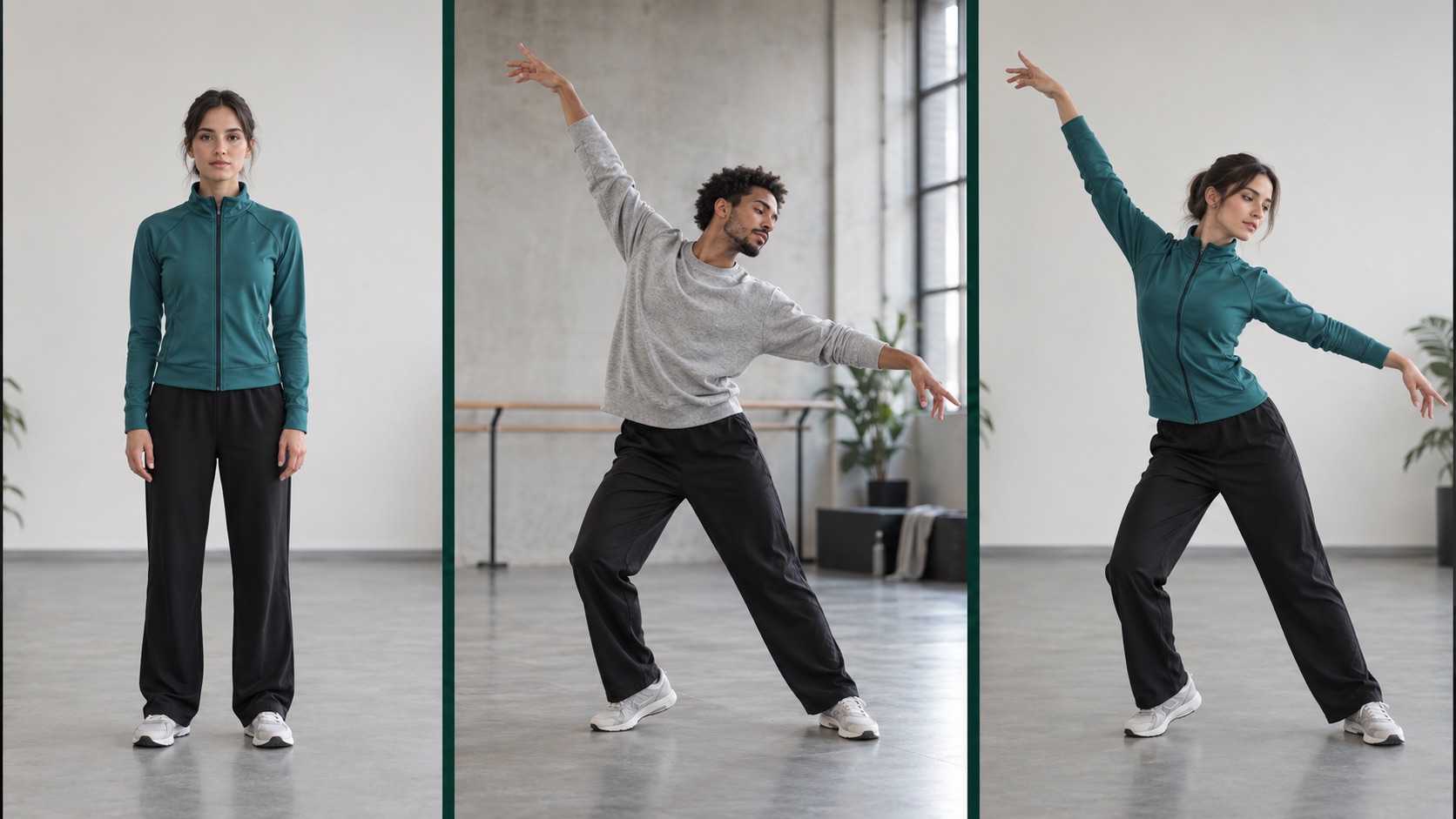
What do the character image and performance each provide?
- 01 · Character image: appearance
- 02 · Reference video: movement
- 03 · Goal: appearance plus movement
AI editorial illustration, not a Kling generation. This explains the input relationship. Watch the 8 public KIE videos in the tool for actual motion demonstrations.
5. Character creators: reuse a performance with Motion Control
Best fit: you own a character design and a short performance reference, and want the character to attempt that movement. A wave, a small presentation gesture or a short dance study makes a manageable first task.
Prepare: a clear character image and a reference with one visible performer. Match the framing: a full-body dance needs the feet in both the intended output and the source performance. Avoid a reference where another person repeatedly blocks the subject.
Workflow: use the dedicated Motion Control tool, inspect the detected duration and credit quote, then generate one candidate. Watch the largest turn and fastest movement before judging subtle facial details. If those moments fail, simplify the performance reference.
The felt character follows the reference hand gesture.
Preserve the blue jacket, rounded face and soft fabric texture.
Use a quiet studio with even lighting and a plain background.
Keep the complete upper body visible throughout the performance.
Accept when: the movement is readable, the character stays recognizable and the clip contains no distracting hand, face or foot artifacts. Exact motion reproduction is not guaranteed.
Stop when: the reference cannot show the required movement clearly, the design has anatomy the model cannot handle consistently or the job requires exact biomechanics. Dedicated animation and filmed motion remain useful for those requirements.
This is a distinct workflow powered here by Kling 2.6. It should not be confused with a Kling 4.0 keyframe feature, a camera-motion prompt or a live puppeteering interface.
6. Educators: fictional context around a lesson
Best fit: an educator needs a short fictional situation to introduce a discussion, show a setting or create a narrative transition. This is easier to validate than a generated demonstration of a precise physical procedure.
Prepare: the learning objective, a script reviewed for factual accuracy and a clear distinction between illustration and evidence. Choose a scene whose purpose survives even if its visual style is simplified.
Workflow: write the teaching point first, generate only the contextual scene, then attach the approved narration and labels. Ask a subject expert to review the finished sequence. Test whether the scene helps a learner understand the lesson rather than merely remember the visual effect.
A fictional workshop before a design discussion.
Two simple wooden models sit on a clean table.
The camera slowly reveals the models from left to right and then stops.
Warm neutral light, no text, no machinery in operation.
Leave space for labels that will be added in the editor.
Accept when: the context is clear and nothing in the action contradicts the lesson. Use captions or narration to make the illustrative role explicit where needed.
Stop when: the content teaches a safety-critical procedure, asserts an unverified historical event or depends on exact scientific motion. Use authoritative diagrams, verified footage or a specialist animation workflow for those portions.
For a small pilot, show the scene to a few representative learners and ask them to explain the intended point. This is a suggested formative check, not a validated educational effectiveness measure.
7. Internal communications and events: a controlled visual opening
Best fit: a communications lead wants a short abstract or fictional introduction before an approved message. It can give an event or internal video a coherent visual theme without putting factual claims inside the generated scene.
Prepare: the approved message, audience tone, final placement and an owner for review. If a real employee’s likeness or voice is involved, establish permission and an appropriate review process before creating the asset.
Workflow: produce the visual opening separately from the factual message. Add dates, names, numbers and brand typography as editable layers. Watch the result on the screen where it will actually be shown, because a composition that works on a phone may feel sparse on a large display.
A folded paper landscape opens slowly on a simple tabletop.
Small geometric trees and a path appear as the paper unfolds.
One gentle overhead camera move, soft neutral light.
End on a stable open landscape with an empty central area for a title.
Accept when: the tone suits the audience, the message remains legible and the opening does not imply a real event that never happened.
Stop when: reviewers cannot agree on factual content, an executive likeness is unapproved or the result becomes a substitute for an authentic announcement that should be recorded directly.
Decide who owns each part of the workflow
Small teams can combine roles, but should not leave them implicit. The brief owner decides the purpose. The asset owner approves references and permissions. The operator records inputs and settings. The reviewer checks the whole clip. The editor assembles the accepted footage and factual overlays.
Keep a short log with the brief version, input files, model, settings, task ID, generated cost, review result and remaining edits. Record rejects as well as successes. Otherwise the team’s cost estimate measures only its best outcomes.
For a first pilot, one small deliverable is enough. Define a stopping rule before generating: for example, after three candidate versions, revisit the brief instead of automatically buying more attempts. That is an example planning boundary, not a model limit or a universal budget recommendation.
For live or on-stage playback, approve the clip as recorded material first, then test playback and switching in a controlled environment. This guide covers offline generation; it does not promise live character control or a streaming latency target. An asynchronous job queue is not a live performance engine.
Measure the result that matters to your audience
Evaluate production usefulness before marketing impact. First ask whether the clip passed the factual and visual checks. Then ask how much work it took to reach that state. Only after publishing should you measure audience behavior, using the analytics appropriate to the placement.
| Stage | Useful measure | What it does not prove |
|---|---|---|
| Generation | Total spend across all candidates | That the footage is usable |
| Review | Accepted clips divided by attempted clips | That viewers prefer the content |
| Editing | Time to an approved deliverable | That the model improved campaign results |
| Distribution | The placement’s actual audience metric | That the model alone caused a change |
A team that needs authentic product operation, legally significant evidence, exact movement or live interaction may find generated video unsuitable for its central task. It can still be useful for planning or illustrative inserts, with the same careful separation between concept and approved material.
Before scaling, count your review capacity too. Generating more clips without someone to inspect each one produces more unapproved material. Establish clear acceptance and rejection criteria before increasing volume.
Frequently asked questions
Who is most likely to find these workflows useful?
Creators and small teams who can define a short brief, inspect the result and revise it. The workflow is less suitable when no one can review the subject accurately or the deliverable depends on guarantees the tool does not provide.
Can one generated clip become several campaign formats?
Plan the framing for each placement and check each crop. A horizontal composition may lose the subject in a vertical crop. Do not assume resizing alone preserves the message or space for captions.
Can Kling 4.0 replace a production team?
It can supply candidate material for selected tasks. Briefing, permissions, factual review, editing and distribution still require decisions. Evaluate the part of the workflow you are changing rather than treating the whole production process as one generation step.
Where should a beginner start?
Choose a simple character gesture or object reveal, then follow the step-by-step guide. If you already have the performance you want to reuse, start with Motion Control and one short reference.
Capability context, checked October 6, 2026: Kling 4.0 announcement, Multiple Keyframes guide and KIE Motion Control API documentation. The cover is an editorial illustration. All scenarios and prompts are proposed examples, not reported client outcomes.

Turn your brief into a video
Start with text or a reference image. Choose an available model, duration and aspect ratio in the studio, and review the credits before submitting.